The Demo That Lied: Why Context Engineering Is the Real Game
Your agent demo crushed it. Everyone in the room was nodding. The bot answered questions crisply, pulled the right docs, even handled a tricky follow-up. Then you shipped it. And by turn three in a real conversation, it forgot the customer's name, retrieved a doc about refund policies when the question was about billing cycles, and confidently made up a pricing tier that doesn't exist.
You didn't have a model problem. You had a context problem.
The Demo That Lied
Here's why demos work and production doesn't. In a demo, the conversation is short — three, maybe four turns. The knowledge base query is simple and clean. There's no prior history, no stale data, no ambiguity. The context window is pristine almost by accident.
Production is a different animal. Conversations go 15, 20 turns. Your retrieval pipeline is pulling from a knowledge base that was last updated three weeks ago. The user corrected themselves twice in turn six, but by turn twelve, the agent has lost that thread entirely. The context window is full, but full of the wrong things.
This isn't a gut feeling. Chroma Research studied what happens as you feed more tokens into an LLM's context window. Performance degrades between 13.9% and 85%, even when the input stays well within the model's claimed limits. They call it "context rot" — and it's happening to your agent right now.
The demo succeeded because the context was clean. Not because you engineered it that way — because the demo was too simple to break it. Production needs that cleanliness by design.
The Prompt Ceiling
I get it. When your agent starts misbehaving, the first instinct is to fix the prompt. Add more instructions. Be more specific. Throw in a few examples. And sometimes that works — for a day or two, until the next edge case shows up.
The problem is that prompt engineering optimizes one layer: the instruction. But production agents fail at layers that prompts simply cannot reach.
Stanford researchers found that when relevant information is positioned in the middle of the context window — not at the beginning, not at the end, but buried in the middle — accuracy drops from roughly 75% down to 55%. Your carefully crafted prompt can't fix bad positioning. It doesn't control where the retriever places information.
There are three failure patterns that no prompt can solve:
Context rot. As conversations grow longer, the model's attention budget spreads thinner. Every token competes for attention, and by turn fifteen, that critical correction the user made in turn four is statistically invisible.
Retrieval drift. Your RAG pipeline returns chunks that are semantically similar to the query but factually irrelevant. The user asks about "subscription billing cycle changes" and the retriever surfaces a doc about "subscription plan features" because the embeddings are close. Close isn't correct.
Tool sprawl. You gave the agent forty tools because you wanted it to be capable. But capability without focus is noise. The model now has to parse forty tool descriptions before deciding which one to call — and LangChain's State of Agent Engineering report found that 32% of organizations cite quality as their top barrier with production agents. Most of those quality failures trace back to context management, not model capabilities.
Prompt engineering is like perfecting the subject line of an email while attaching the wrong files. The instruction matters. But it's maybe 20% of what determines whether your agent actually succeeds.
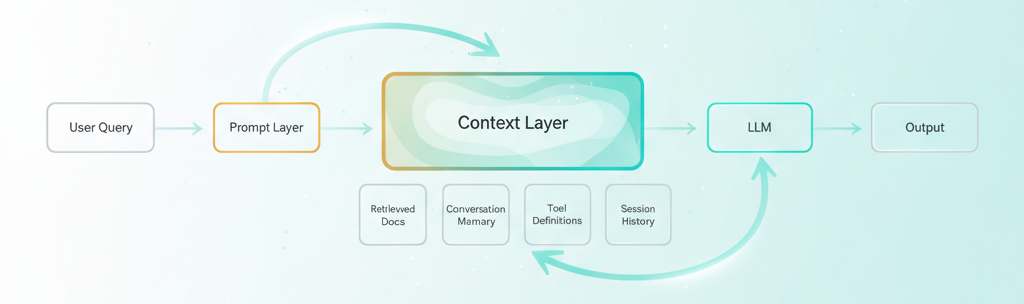
Prompt engineering optimizes the yellow box. Context engineering optimizes the green one — and that's where your agent actually lives.
The Context Stack You're Not Building
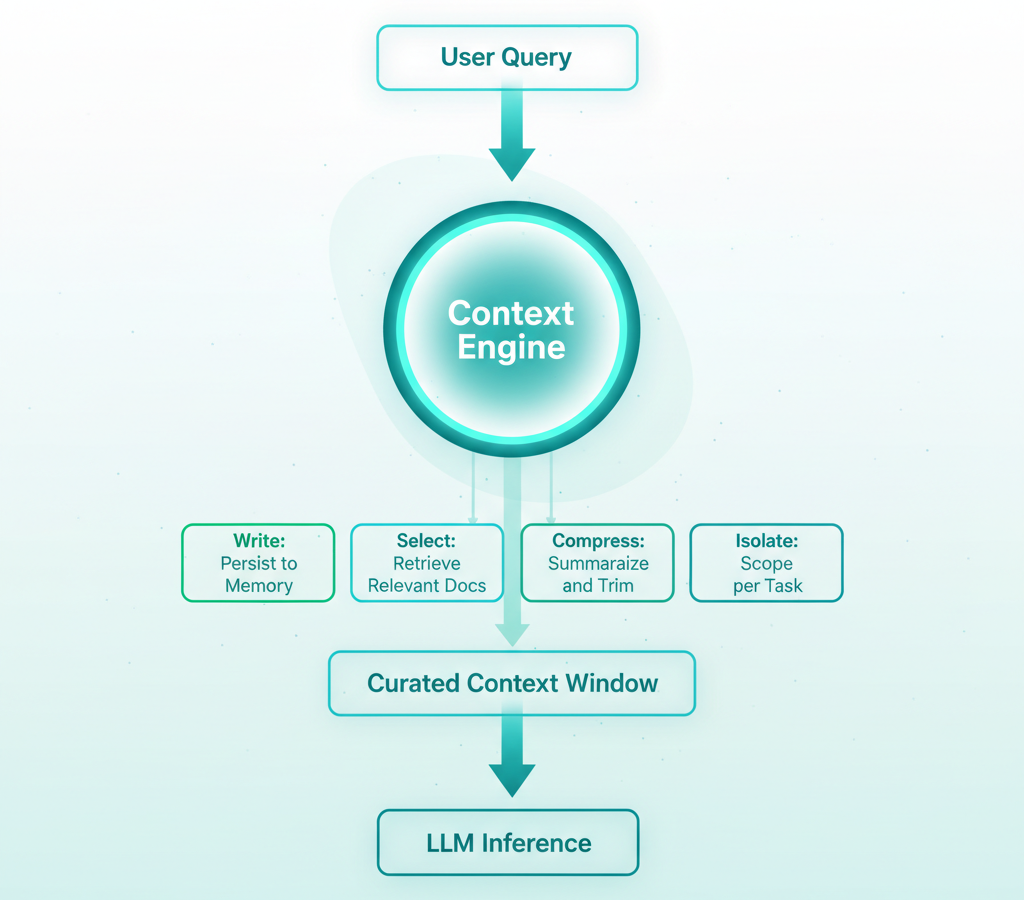
LangChain's context engineering framework gives us four verbs that capture the discipline: Write, Select, Compress, Isolate. These aren't abstract concepts — they're the four things you do to the context window before the model ever sees it.
Write means persisting information so the agent can recall it later. Conversation summaries, user preferences, task state, intermediate results. If your agent can't remember what happened two sessions ago, you have a Write problem.
Select means dynamically retrieving only what's relevant right now. Not "everything that's somewhat related" — what the agent actually needs for this specific turn. Semantic search with re-ranking, filtered by recency, scoped to the right domain.
Compress means shrinking context without losing meaning. Summarizing old conversation turns. Deduplicating retrieved chunks. Trimming tool outputs to just the fields that matter. Your context window is a budget — spend it wisely.
Isolate means scoping context per task or agent so different workflows don't pollute each other. A billing conversation shouldn't carry context from a product inquiry. A research sub-agent shouldn't see the customer-facing chat history.
Most teams only do Select — and barely. They set up a basic RAG pipeline, retrieve the top-K chunks, and call it done. They skip Write entirely (no persistent memory). They ignore Compress (dump the full conversation history every turn). And they never Isolate (one monolithic context for everything).
Here's what's interesting: on SWE-bench benchmarks, approaches using full-file context achieved roughly 95% accuracy, compared to about 80% for fragmented retrieval. More context can be better — but only when it's the right context, properly organized. The skill isn't stuffing more in. It's knowing what to keep and what to cut at every step of the agent's trajectory.
Three Techniques That Actually Ship
Enough theory. Here are three changes you can make to an existing agent this week.
Technique 1: Context Compaction. After every N turns (start with 5), summarize the older conversation history and replace the raw turns with the summary. You preserve the meaning while freeing up token budget for what matters — the current question and fresh retrieval. LangChain's ConversationSummaryBufferMemory does exactly this pattern: keeps recent turns verbatim, summarizes everything older. The result is an agent that stays coherent at turn twenty instead of degrading at turn seven.
Technique 2: Semantic Retrieval Filtering. Stop trusting your retriever's top-K blindly. After retrieval, re-rank the chunks by relevance to the current turn specifically, not just the overall conversation. Set a similarity threshold and drop anything below it. Three highly relevant chunks will outperform ten loosely related ones every single time. Your LLM doesn't need more options — it needs better ones.
Technique 3: Dynamic Tool Curation. Don't hand the agent every tool at every step. If the user is asking about their bill, the agent doesn't need the product catalog search, the shipping tracker, or the feedback submission tool. Scope the available tools to the current task phase. LangGraph supports dynamic tool binding per node — you define which tools are available at each step of the workflow, not globally. Fewer tools means less noise in the context window and more accurate tool selection.
Notice how each technique maps back to the framework. Compaction is Compress. Filtering is Select. Tool curation is Isolate. The framework isn't academic — it's a checklist you can run against your agent today.
Before and After: A Support Agent, Rewired
Let's make this concrete. You've got a customer support agent that handles subscription billing queries.
Before — prompt-engineered only:
- System prompt: 2,400 tokens (every possible instruction)
- Conversation: Full history, all turns, verbatim
- Retrieval: Top-10 chunks from entire knowledge base
- Tools: All 12 support tools available every turn
It works for 3-4 turns. By turn eight, it starts repeating itself. By turn twelve, it retrieves a doc about enterprise pricing when the customer is on a personal plan. Occasionally it calls the wrong tool — tries to issue a refund when the customer just wanted to understand their next invoice date.
After — context-engineered:
- System prompt: 800 tokens (role + current task scope only)
- Conversation: Last 5 turns verbatim + summary of older turns
- Retrieval: Top-3 chunks, scoped to billing docs, re-ranked
- Tools: 3 billing-relevant tools for this workflow phase
Same agent. Same model. The system prompt barely changed — it actually got shorter. What changed is everything the model sees. The conversation summary keeps it coherent across long interactions. Scoped retrieval means it pulls the right docs. Limited tools mean it picks the right action.
The result: coherent through 15+ turns. Relevant retrieval. Accurate tool selection. Not because the model got smarter, but because the context got cleaner.
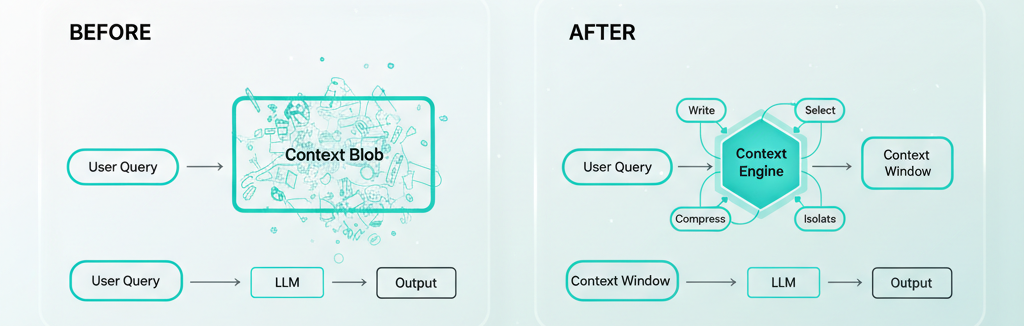
If you're using LangGraph, this maps directly to your graph architecture. Each node in the graph can have its own context policy — what to retrieve, which tools to expose, how to manage memory. The graph is your context architecture.
Key Takeaways
- Context engineering optimizes the 90% of the context window that prompt engineering ignores. Your system prompt is maybe 10% of what the model sees — retrieval, conversation history, tool definitions, and memory make up the rest.
- Use the Write/Select/Compress/Isolate framework as a checklist against your current agent. Most teams only do Select (basic RAG) and skip the other three entirely.
- Three wins you can ship this week: context compaction after every 5 turns, semantic retrieval filtering with a similarity threshold, and dynamic tool curation scoped to the current task phase.
- The agent that wins in production isn't smarter — it has a cleaner context window. Same model, dramatically different results.
The Digixr Take
Stop hiring prompt engineers. Start building context architectures.
The agent that wins in production isn't the one with the cleverest system prompt. It's the one that knows exactly what it needs to know, exactly when it needs to know it. Not more. Not less. Just right.
Prompt engineering was the training wheels. It got us started. It taught us that how you talk to models matters. But we've ridden past that stage now. The models are capable enough. The tooling is mature enough. The bottleneck has moved.
Context engineering isn't a buzzword upgrade. It's the discipline that was always missing — the engineering rigor applied to everything around the prompt that determines whether your agent actually works when real users show up with real problems on a Tuesday afternoon.
Your agent's next breakthrough won't come from a better prompt. It'll come from a better context architecture. Build that.
What's the worst context failure you've debugged in production? I'd genuinely like to hear — find me on LinkedIn or X.